
Playing JAV and Eroge in English: Real-Time Translation Solutions for Non-Japanese Speakers
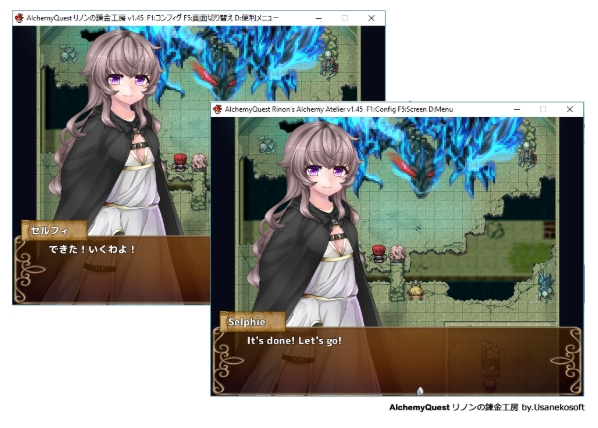
Japanese adult games, or eroge, are a unique medium that blends compelling narratives, intricate characters, and explicit content. For non-Japanese speakers, the language barrier has long been a locked door. But what if you had a master key? Modern NSFW auto-translator tools have evolved from clunky curiosities into powerful utilities, capable of granting you access to thousands of untranslated gems.
This guide is your roadmap. We’ll move from the why to the how, introducing you to the best tools, walking you through a step-by-step translation process, and sharing pro tips to elevate your experience. Forget language classes; it’s time to become a tech wizard of fan translation.
The Language Barrier: Why Japanese Adult Games are Worth Translating
Before we dive into the tools, let’s address the core motivation. Raw Japanese games represent an enormous, uncensored world of content. Official translations are slow, selective, and often sanitized. Many niche titles—especially those with specific fetishes or complex plots—never see the light of day in English.
Auto-translation breaks this wall. It’s not about perfect literary translation; it’s about immersion. You gain the ability to understand character motivations, follow story twists, and grasp the context of intimate scenes. The goal is functional comprehension, letting you appreciate the art, gameplay, and scene context without needing to learn kanji. It’s about reclaiming the narrative and exploring the vast library of NSFW visual novels and RPGs on your own terms.
Top Tools for Automatic Translation of NSFW Games
Not all tools are created equal. The best choice depends on the game’s engine and your desired workflow (real-time vs. batch). Here’s a breakdown of the community’s top contenders.
Translator++: The Powerhouse for Ren’Py and RPG Maker

Translator++ is the Swiss Army knife for fan translation. It doesn’t translate in real-time; instead, it extracts all the game’s text, lets you process it through a machine translation engine, and then re-injects it. This makes it incredibly powerful for complete playthroughs.
- Best for: RPG Maker (MV, MZ, VX Ace), Ren’Py, Wolf RPG Editor, and Unity games.
- Pros: Batch translation, high accuracy of text extraction, built-in dictionary tools, can create permanent translation patches.
- Cons: Requires a bit more setup, not for real-time use.
Textractor: Real-Time Translation for Visual Novels
Textractor is the go-to tool for real-time translation of visual novels. It «hooks» into a running game process, captures text as it appears in the game’s memory, and displays a translation in an overlay window.
- Best for: Most Windows-based visual novels (especially older ones using Kirikiri or NScripter engines).
- Pros: Instant translation, lightweight, vast library of community-made «hooks» for specific games.
- Cons: Translation can be jittery as text updates, may require finding the right hook, overlay can be intrusive.
Sugoi Toolkit: High-Quality Offline DeepL Translation
For those prioritizing quality and privacy, Sugoi Toolkit (or its standalone variant, Sugoi Translator) is a game-changer. It uses a custom, locally-run DeepL-like model specifically fine-tuned for Japanese-to-English translation, especially for conversational and literary text.
- Best for: Users with a decent GPU (NVIDIA recommended) who want the highest quality offline translation.
- Pros: Exceptional translation quality, works completely offline after setup, no API limits.
- Cons: Hardware-intensive setup, larger file sizes, can be slower than cloud-based options.
Step-by-Step Guide: How to Translate an Adult Game Using Translator++
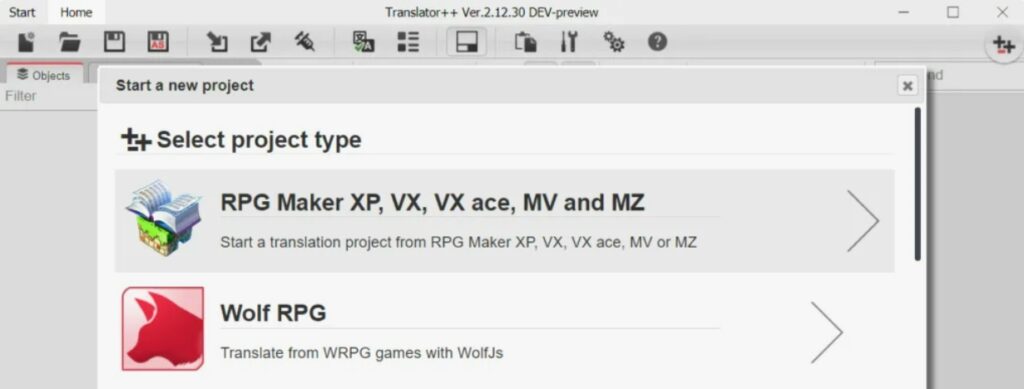
Let’s get practical. We’ll use Translator++ as our primary example due to its versatility and patch-creation ability.
Важное предупреждение: Всегда делайте полную резервную копию папки игры перед началом любого процесса перевода. Неправильная инъекция может повредить файлы игры.
Step 1: Exporting Game Text for Translation
- Open Translator++ and select the correct Game Engine from the dropdown menu (e.g., RPG Maker MV).
- Click Open Game and navigate to the game’s main folder (usually where the .exe file is located).
- Click Scan. The program will now analyze the game files and extract all translatable text strings into a structured project.
Step 2: Choosing the Translation Engine (Google, DeepL, Papago)
- In your Translator++ project, go to the Translation menu.
- Select your engine. Google Translate is free and fast. DeepL offers superior quality but requires a paid API key for heavy use. Papago is excellent for Korean and decent for Japanese.
- (Optional) Configure a custom dictionary for recurring game-specific terms (e.g., character names, skill names, unique fetishes).
- Click Translate All. The software will send the text to the selected service and populate the translation fields.
Step 3: Injecting Translated Text Back into the Game
- Once translation is complete, it’s wise to do a quick review. You can manually edit any obviously mistranslated lines in the main window.
- Click the Patch button (or go to Game > Patch). Translator++ will compile the translated text and create modified game files.
- The program will typically create a new, translated version of the game in a separate folder or directly patch the original (hence the need for a backup!).
- Launch the game from the new patched .exe file. Your game should now be in English.
How to Handle Special Characters and Formatting in Adult Titles
Japanese games often use special formatting codes for text color, pauses (\w, \n), and voice actor line triggers. A clumsy translation can break these.
- Preserve Codes: Tools like Translator++ are designed to treat these codes as inviolable tags. Never translate text inside <> or {} brackets.
- Font Issues: If you see garbled characters (mojibake) after patching, the game’s font may not support English. You may need to replace the font file—a common practice in the RPG Maker community.
- Line Length: English text is often shorter than Japanese. Be mindful that very long translated lines might overflow text boxes. Some tools allow for manual line breaks.
Pro Tips for Improving Translation Quality (Using Custom Dictionaries)
Machine translation is literal. It doesn’t understand context. This is where you step in.
- Build a Custom Dictionary: Before doing a batch translation, spend 15 minutes playing the game with Textractor or a manual hook. Note down key terms: character names, locations, special abilities, and crucially—key fetish or scene terminology. Add these with their correct translation to Translator++’s dictionary. This forces the tool to use «Lilim» instead of «Small Forest» for a character name.
- Post-Translation Editing: Treat the first machine pass as a rough draft. Play the patched game and keep a notepad open. When you see a clunky or nonsensical line, note the file and line number, then go back and edit it in Translator++ for future playthroughs.
- Community is Key: Check forums for the specific game. Often, other fans have already created shared dictionaries or lists of tricky translations.
Conclusion
The world of untranslated Japanese adult games is no longer an impenetrable fortress. With tools like Translator++, Textractor, and Sugoi Toolkit, you have the power to unlock it. The process is part tech project, part personal curation—you’re not just playing a game, you’re actively bridging a cultural and linguistic gap.
Start with a simple Ren’Py or RPG Maker title, follow the steps, and don’t fear experimentation. Your journey from confused onlooker to immersed player begins with a single click on the Scan button. Happy translating!
Frequently Asked Questions (FAQ)
If you use reputable tools correctly and always back up your game folder first, the risk is low. The main «breakage» comes from poor formatting or font issues, which are usually fixable. Corrupting the actual game executable is rare with modern tools.
For quality, DeepL is consistently the best cloud-based option. For offline, locally-run translation, Sugoi V4 (if you have the hardware) provides astonishingly good, context-aware results specifically for Japanese media.
Yes. While Translator++ supports some Unity games, the dedicated tool for real-time Unity translation is XUnity Auto Translator (with the BepInEx mod framework). It works similarly to Textractor but is built specifically for the Unity engine.
Absolutely. Tools like Translator++ allow you to export your translation project as a patch file (.tpp). Others can then use Translator++ to apply your patch to their own copy of the game. Always respect the game developer’s copyright and share patches only for games you own.
Other articles
 None
None
 None
None
 None
None
 None
None
 Back
Back
 None
None
 None
None
 None
None
 None
None

