
How to Play PC Adult Games on Android: The Ultimate JoiPlay Setup Guide

Tired of being chained to your desk to enjoy your favorite adult visual novels and RPGs? What if you could take those NSFW adventures with you on your phone? With the JoiPlay emulator, that dream becomes reality. This guide will transform your Android device into a portable haven for PC adult games, offering you freedom and privacy. Let’s dive in.
What is JoiPlay and Why Is It a Game-Changer for Adult Gaming?
JoiPlay isn’t your typical Android emulator like Bluestacks. It’s a specialized application designed to run PC games built on popular storytelling and RPG engines directly on your Android device. Think of it as a custom-built interpreter that translates game code meant for Windows into something your phone can understand.
For the adult gaming community, this is revolutionary. Instead of waiting and hoping for a specific adult visual novel to get an official Android port (which often gets censored), you can play the original, uncensored PC version on your phone. JoiPlay gives you access to a vast, unfiltered library of Ren’Py, RPG Maker (MV, MZ, VX Ace), and even some Unity games right in your pocket.
Prerequisites: What You Need Before Starting
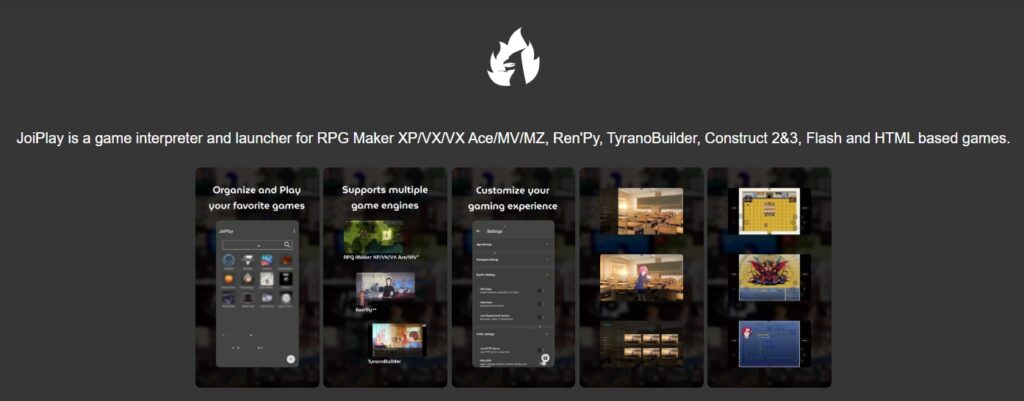
Before you begin, make sure you have everything on this checklist:
- An Android Device: Preferably with at least 4GB of RAM for a smooth experience. 6GB+ is recommended for heavier 3D or high-resolution Unity games.
- The Game Files: You must own the legal PC copy of the adult game you want to play. This usually comes as a ZIP, RAR, or 7z archive from platforms like Patreon, itch.io, or Steam (though DRM-protected Steam files often won’t work).
- A File Manager: You’ll need a robust app to navigate and extract files. We highly recommend ZArchiver.
- Storage Space: Ensure you have enough free space for JoiPlay, its plugins, and the game files, which can range from 200MB to several gigabytes.
- Permission to Install from Unknown Sources: You’ll need to allow this for the JoiPlay APK, unless you download it from the Google Play Store (a limited version is available there).
Step-by-Step Guide: Setting Up JoiPlay for Your Favorite NSFW Titles
Step 1: Downloading JoiPlay and Required Plugins
First, head to the official JoiPlay website or their Patreon page to get the latest version of the main app (it’s often more up-to-date than the Play Store version). Next, you’ll need the corresponding plugins for the game engines you want to run:
- Ren’Py Plugin: Essential for 90% of adult visual novels.
- RPG Maker Plugin: For RPG Maker MV, MZ, VX, and VX Ace games.
- Tyranobuilder Plugin: For games made in that specific engine.
Important: Always download plugins from the official JoiPlay source. Install the main JoiPlay app first, then install each plugin APK.
Step 2: Preparing and Extracting Adult Game Files
You cannot run a game from its compressed archive. You must extract it.
- Locate your downloaded game file (e.g., My_Adult_Game-1.0-pc.zip) using ZArchiver.
- Long-press the file and select «Extract.»
- Choose a destination folder, preferably a dedicated one like /Games/. This will create a new folder with the game’s contents.
Inside, you should see files like Game.exe, renpy.exe, www folder (for RPG Maker), or a Game folder. Remember this location.
Step 3: Adding the Game to the Library
Now, let’s bring your game into JoiPlay.
- Open the JoiPlay app.
- Tap the + (Add Game) button in the bottom-right corner.
- Game Name: Enter whatever you like.
- Executable File: Tap this and navigate to the folder you extracted in Step 2. Select the main game file (e.g., Game.exe). This is the most crucial step.
- Icon & Cover: You can add custom images for your library.
- Hit «Add». Your game will now appear in the JoiPlay library. Tap it to start your erotic adventure!
Best Game Engines Supported by JoiPlay (Ren’Py, RPG Maker, and More)
Not all engines are created equal in JoiPlay’s world. Here’s a quick compatibility breakdown:
| Engine Type | Primary Use | JoiPlay Compatibility Level | Notes |
| Ren’Py | Visual Novels | High | The gold standard. Runs almost flawlessly. Perfect for story-driven NSFW content. |
| RPG Maker | 2D RPGs | High | Excellent support for MV/MZ. VX Ace works well with its dedicated plugin. |
| Unity | 2D/3D Games | Medium | Heavily depends on the game’s version and complexity. 3D games may strain older phones. |
| Tyranobuilder | Visual Novels | Medium-High | Requires its own plugin. Generally works well for supported titles. |
Performance Optimization: How to Play Heavy 3D Games Without Lag
If your game is stuttering, don’t give up. Try these tweaks in JoiPlay’s game settings (tap the three dots next to a game in your library):
- Enable «Use Fast Performance Mode»: This should be your first toggle. It significantly boosts speed for many games.
- Enable «Use PWA Mode»: Particularly helpful for some RPG Maker MV/MZ titles.
- Enable «Use Alternative Rendering»: Fixes graphical glitches in some Ren’Py games.
- Reduce Screen Resolution: If your game has an in-game settings menu, lower the resolution from 1920×1080 to 1280×720.
- Close Background Apps: Free up that precious RAM.
Troubleshooting Common Issues in Android Adult Gaming
- Black Screen/Game Won’t Start: 99% of the time, you’ve selected the wrong Executable File. Go back and ensure you’re pointing to the main .exe (like Game.exe) inside the extracted game folder, not the archive.
- No Sound in Game: Ensure you’ve installed the Ren’Py plugin (even for some non-Ren’Py games, it provides audio codecs). Also, check your phone’s volume and the in-game settings.
- Save File Transfer (PC to Android): On PC, find your game’s saves folder (often in AppData). On Android, place those save files in /storage/emulated/0/Android/data/com.joiplay.joiplay/files/[Game Name]/. This path is created after your first run of the game in JoiPlay.
Conclusion
Setting up JoiPlay is your key to unlocking a massive, portable library of PC adult games. While it requires a bit more initial setup than downloading a simple APK, the payoff—access to the original, uncut versions of your favorite NSFW titles anywhere—is immeasurable. Follow this guide, be patient with the setup, and a world of adult gaming freedom awaits you in the palm of your hand.
Frequently Asked Questions (FAQ)
For simple 2D Ren’Py or RPG Maker games, no. For complex 3D Unity games, a phone with a good GPU and at least 6GB of RAM is recommended to avoid lag and crashes.
Yes! Locate the save folder on your PC (often in C:\Users\[YourName]\AppData\Roaming\RenPy\[GameName] for Ren’Py). Then, transfer the save files to the corresponding JoiPlay save directory on your Android device (path mentioned in Troubleshooting).
First, double-check that you’ve installed the necessary plugin (especially the Ren’Py plugin, as it contains audio libraries). Then, check both your phone’s media volume and the in-game audio settings after launching.
It depends. A well-made native APK port will always run smoother. However, JoiPlay offers unparalleled library access to games that will never get an official Android port. It also guarantees you’re playing the original, uncensored version without modifications.
Other articles
 None
None
 None
None
 None
None
 None
None
 Back
Back
 About new products
 None
None
 News
News
 None
None

